
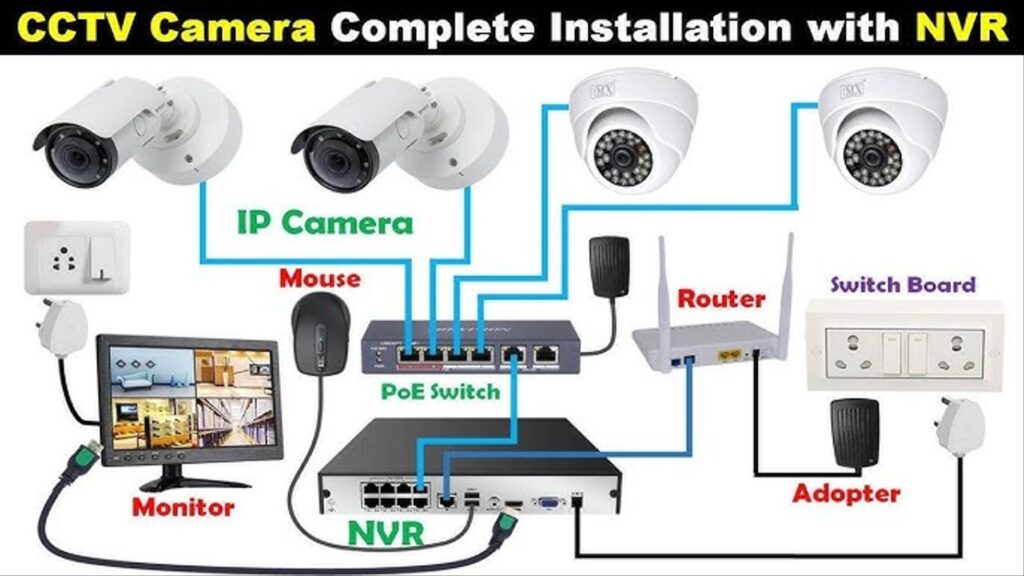
 CCTV Camera Installation – Full Details & Contents
1. Introduction
What is CCTV (Closed-Circuit Television)?
Benefits: security, surveillance, deterrence
Types of CCTV systems:
Wired vs Wireless
Analog vs IP (network-based)
DVR vs NVR systems
2. Types of CCTV Cameras
Bullet Camera
Dome Camera
PTZ (Pan-Tilt-Zoom) Camera
Turret Camera
C-Mount Camera
Infrared/Night Vision Camera
Wireless & WiFi Cameras
3. Tools & Equipment Required
Drill & bits
Screwdrivers
Cable tester
Crimping tool (for RJ45 or BNC connectors)
Ladder
Hammer
Fish tape (for running cables)
Monitor (for testing)
Laptop (for IP configuration)
4. Planning the Installation
Site survey & camera placement
Determining number of cameras
Coverage areas (entry points, perimeter, indoors)
Power supply planning (centralized vs local)
Cable management plan
5. Choosing the Right System
DVR (Digital Video Recorder) for analog cameras
NVR (Network Video Recorder) for IP cameras
Resolution: 720p, 1080p, 4K
Storage capacity (based on recording time & resolution)
Motion detection & alerts
Remote access support (mobile & PC apps)
6. Installation Process
 Mounting the Cameras
Marking & drilling mounting holes
Mounting brackets & enclosures
Adjusting angle for proper coverage
 Running Cables
RG59 coaxial + power cable (for analog systems)
Cat5e/Cat6 Ethernet cable (for IP systems)
Cable length limitations
Using conduits or cable trays
 Power Supply Setup
12V DC or 24V AC adapters
Centralized power supply box (for multiple cameras)
PoE (Power over Ethernet) for IP cameras
 Connecting Cameras to DVR/NVR
Analog: BNC connectors + power
IP: RJ45 Ethernet cables (PoE or non-PoE)
 Connecting Monitor & Testing
HDMI/VGA to display
Checking video feed from all cameras
7. Network Configuration (for IP/NVR systems)
Assigning static IP addresses
Configuring router for port forwarding
Setting up DDNS (Dynamic DNS) if needed
Testing remote access (mobile app, web browser, PC software)
8. Camera Configuration
Resolution & frame rate settings
Motion detection zones
Recording schedule (24/7 or motion-based)
Night vision IR sensitivity
PTZ presets (if applicable)
9. Storage Setup
HDD selection (Surveillance-grade, e.g., 1TB–6TB)
Loop recording
Backup options: USB export, cloud backup (if supported)
10. Troubleshooting Common Issues
No video feed
Camera not powering on
Network/IP conflict
Mobile app not connecting
Night vision not working
Image too bright/dark
11. Maintenance & Best Practices
Regular cleaning of camera lenses
Checking for loose cables
Software/firmware updates
Reviewing recordings periodically
Ensure DVR/NVR is in a secure, ventilated location
12. Legal & Privacy Considerations
Informing staff/visitors if required
Avoiding private areas (bathrooms, bedrooms, etc.)
Compliance with local surveillance laws
13. Optional Add-ons
Microphones for audio recording
Alarm integration
Motion sensors
Solar-powered cameras
Cloud storage or hybrid systems